
AI can of course be very powerful, but it can also be super expensive. While I’ve had the best results from working with Claude’s models, it’s far from the cheapest and can run down subscriptions really quickly. If you’re using API billing, good luck to you.
Google Antigravity - $20
I’ve heard good things about Google Antigravity, however, as of recent the subscription service has absolutely hit rock bottom. Not only do you have 5-hour windows, but you also have weekly windows for which you have no way of seeing how much you’ve actually used in said window.
While previously, I’m quite sure, before I subscribed to the Google AI Pro for $20 a month; the Gemini Flash and Gemini Pro quotas were different. Use Pro or Claude Sonnet/Opus to plan, and have Gemini 3.5 Flash build and execute – Now pools are combined.
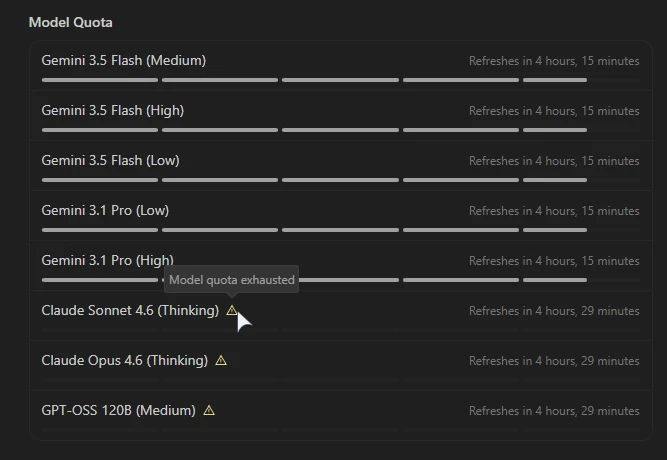
I get 4-5 prompts from Claude Sonnet before I hit the 5-hour quota. +41 -22, +1 -0, +131 -55, +49 -20, +29 -7 and it’s done. This was with Claude Sonnet 4.6 (Thinking). 5-hour window done in 20 minutes.
With every Gemini 3.5 Pro (High) prompt I can see it take a sizable chunk out of the quota, and using the Low model or more so the Flash models (and the Lower settings on those) the bite it takes each time is observably smaller, however you can literally see bites being taken out of the window with every prompt no matter how big or small the response is.
When I first launched Antigravity, I prompted it something which caused it to look through my codebase. This first prompt easily used 1/2 of the 5 “bars” were given. While the remaining work through the night (the next hour or so) took me down to around 1.5 bars left it wasn’t quite as “smart” as Claude. I was stuck in the “You’ve tried this 5 times and it’s not working” knowing what the model will try next and fail with. While, yes, this is user error and prompting it to document what it tried and what didn’t work helps get through these sticky sections and bugs - Claude just doesn’t need this. It reliably does not throw me into these debug loops.
Another huge gripe of mine is that I see thinking appear as it thinks - but after it’s done, it hides the thinking and I can’t see what’s going on behind the “I edited this file… ok bye” type responses the chat window shortens things to.
All-in-all the Claude options are nice with the Google AI Pro plan, but they’re lacking. The Gemini Pro model is okay – But that’s only IF you can use it.
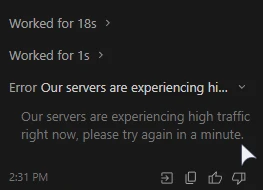
Today I got up to do some work and I literally had no choice but to blow through my 5-hour Claude budget as above. Prompting anything got me a “Error. Our servers are experiencing high load”. Really? I would have paid $20 for pro access to Google’s AI – And I can’t use it?
The ONLY reason I tried Antigravity is I’ve heard how generous it was, but this appears to have changed as recently as March 2026 to May 2026. The price I was offered when choosing a plan was far cheaper - A new account was offered ~$10 for a month, and I was offered ~$10 for 3-months. A no-brainer… However even at this it’s hard to recommend after what I’m trying to work with here.
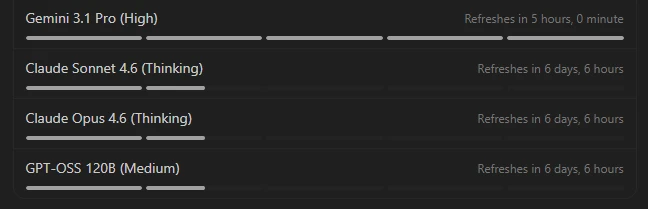
Not to mention, now that I’ve run through 2 complete 5-hour quotas for the Claude models… It says “Refreshes in 6 days” with 1.5 bars left. There is almost no ability to use Claude models and I’d have to say if this is how small the total quota is per week, either let users use it all at once - Or scratch it completely and allocate more budget to the Gemini Pro model.
And also not to mention – GPT-OSS 120B (Medium) – This isn’t an Anthropic model - So WHY is this model included in the same quota as Claude? It’s also open-weight. Once would expect this to be a free fallback or something along the lines when you’re done using Gemini.
Cursor - $20
Cursor is by far the AI subscription I’ve had the most success with and I’ve repeatedly returned to. The limits are genuinely generour if you like their Composer models. Throw it in Auto mode and it picks between Auto + Composer - Composer being their in-house model and Auto giving you slightly discounted rates to other AIs, and you’ll run for a long time.
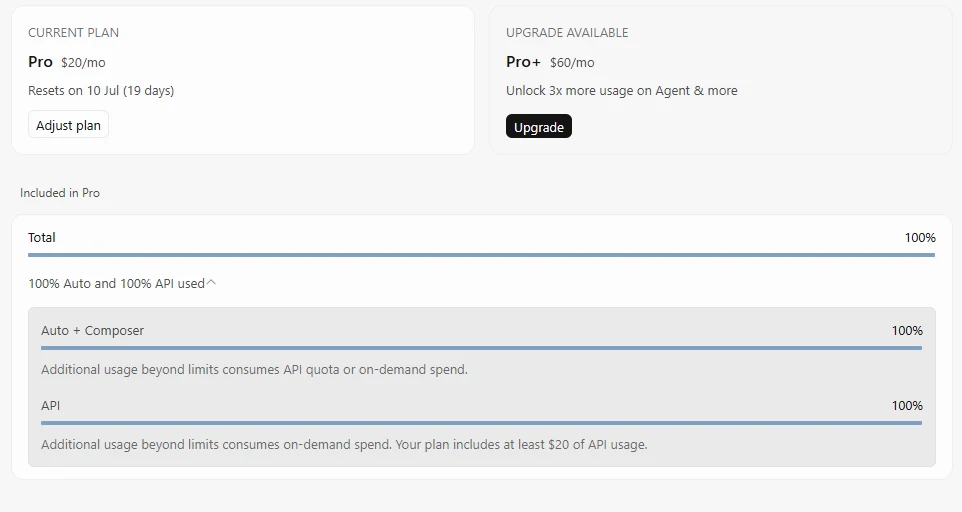
Once your Auto + Composer budget runs out you’re not quite done. Each plan is given what you paid for it in API credit, with the higher plans giving you a little more to a lot more with the most expensive package. “At least $20 of API usage” is what I’m shown. This is used when you choose a specific model to handle a problem instead of choosing Composer or Auto, and can be blown through if you choose to use the most expensive Claude models.
There are many months where I am unable to finish the $20 plan for maintaining projects, but when building new projects from scratch, iterating and bug-squashing I can easily run through 1 or 2 $20 subscription plans. Why multiple accounts? You can get a plan, but once it’s done, it’s done. You can’t refresh the subscription just by paying again, you’re stuck upgrading.
While I would have paid for a $40 plan with 2x the $20 limits - It doesn’t exist. We only have $60 for 3x the limit, or $200 for 20x the limit – Far too expensive for any real gain, and the lower plan being more than what I would realistically use. $40 was a much better point for me most months.
As I’ve recently been exclusively using OpenCode Go, I’ve not had a Cursor subscription. In an attempt from them to pull be back in they offered both of my accounts 1-month on the $20 plan for only $6. I blew through both of them in roughly a week of coding new projects from scratch.
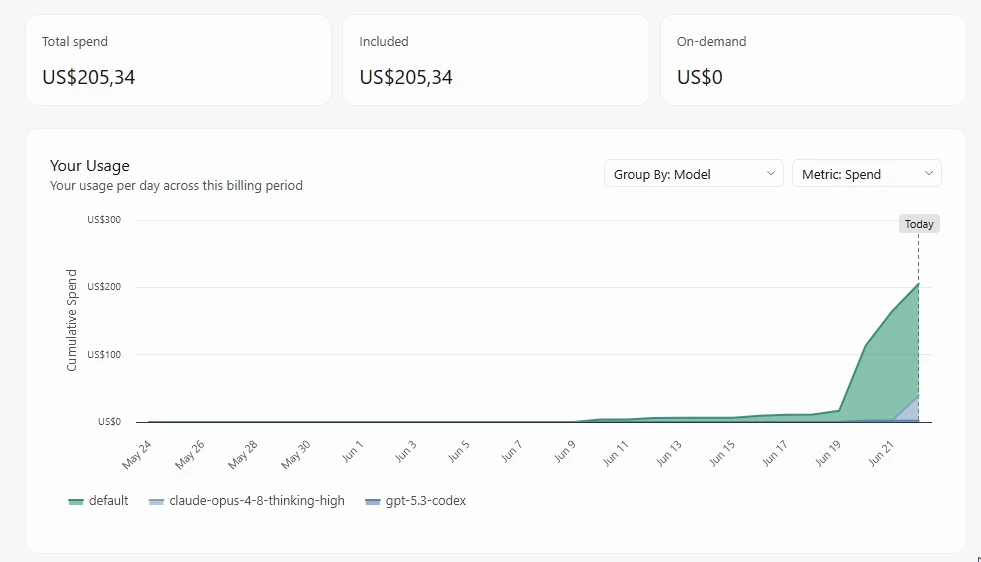
Cursor does offer a great panel for checking your Usage, and according to this I’ve used around $205 worth of tokens. ~$170 in Auto + Composer and whatever model it chose for me as I usually leave it in Auto and forget about it once that first quota ran out, and ~$37 spent on Claude Opus 4.8 Thinking High for tackling a problem it was not solving through many prompts. I comfortably used ~15% of my Auto quota on a single problem because I foolishly did not ask it to write down what it tried and what didn’t work. Had I done so it might have tried more than a few things.
AI is great at solving issues, but when it can’t it will try a few different things. Eventually the window becomes too small to remember what it tried at first, and we’re stuck going from X to Y to Z and back to X once again. Getting models to document what they tried in .md files can help a lot. Had I done so the high Auto usage from many high token prompts would not have been an issue.
While API usage is undoubtedly subsidised for these AI companies, I do feel like I’m getting a reasonable amount from Cursor. Out of all subscriptions I was happy paying for this. Again, as of recent months (March-June 2026) things are, of course, tightening. Less and less usage is possible with quotas as these companies want to become more profitable.
The golden age of subsidized AI is slowly coming to an end.
That being said: Cursor does have 2 quotas, and that’s it. No surge pricing, no you have X number of prompts in Y hours and X number of sessions per week. You pay for the subscription and get a substantial block you can use at your speed. This is a HUGE win for Cursor subs.
Using subagents and the multitask mode gets a lot done. The plan mode is fantastic and the agent mode is what you would expect: bulletproof. The Ask mode is a great addition - You can comfortably quizz the AI anything without worry of it attempting to modify your code base or running commands. You can extend this further with superhuman, but I’ve found that the “Grill me” prompt/skill works great.
OpenCode Go - $5
This, I would say, is singlehandedly the best deal in the market. $5 for your first month, and $10 thereafter for access to top-of-the “sideline” GLM-5.2, DeepSeek, Kimi and more. While they’re not Opus-level, they’re good. For small tasks, or lengthy repetitive tasks, filling in simple code - This is your solution. For debugging Windows issues and interacting with your system - This is your go-to.
I have had a HUGE amount of value form installing OpenCode and calling it from the command line for debugging issues on my Linux gaming handheld, and even debugging Windows latency issues and more. It’s a powerful tool that you can do a ton with using the free models, and pay for access to the better ones.
The $5 for around ~$20 in token spend through DeepSeek V4 flash/pro, Kimi-k2.7, MiniMax and more is fantastic. If your work isn’t hugely creative or requires deep thinking for difficult debugging tasks, you can get a lot done. And best of all it’s super simple to understand what you get.
The Go page explains it all with a simple graph:
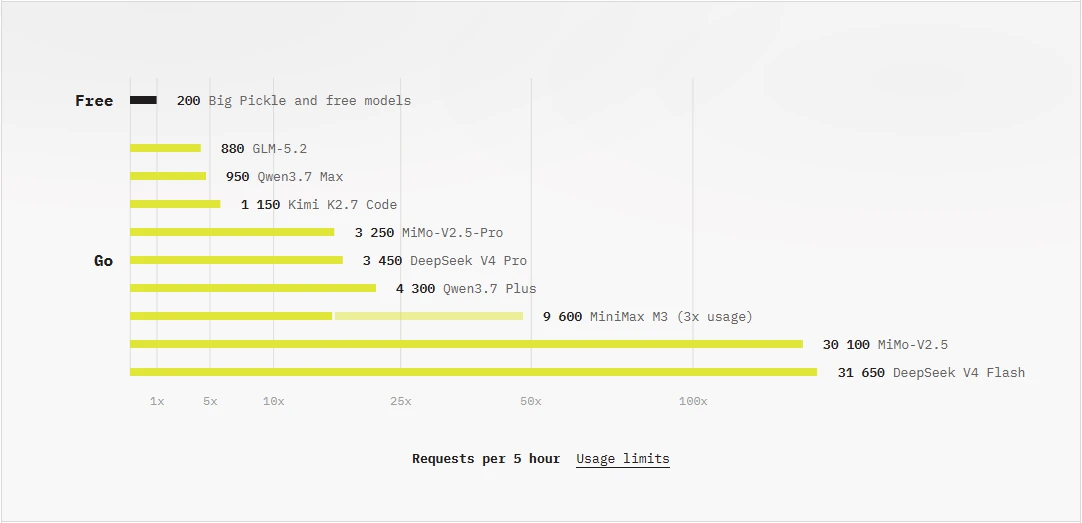
There is a Rolling 5-hour window, a weekly usage quota and a monthly usage cap, which is fine and easy not to hit if you’re using the mid-tier models on offer. The monthly limit is annoying as if you use your cap: You have to use another account. There is no other plans. It’s $5 or nothing.
For a handy open and solve a quick issue, create a quick script, and so on: I can not recommend having this tool installed, and if you want more then signing up for $5 is a no brainer.
While this CLI tool comes with a Plan and Build mode: you can extend this a lot with MCPs and more. I find that the Superpowers really make this program shine, and it supports subagents too! OpenCode also does a fantastic job of showing all the thinking, which can be toggled like many other options with /thinking. Changing models and levels can be done with /model as well as horkeys too.
My usage over each month with 2 subscription plans looks like this (the prices are likely just rough API estimates, and the best numbers are seen on your OpenCode Go website):
| Month | Models | Input | Output | Cache Create | Cache Read | Total Tokens | Cost (USD) |
|---|---|---|---|---|---|---|---|
| 2026-05 | - auto | 40,446,649 | 3,536,823 | 3,109,738 | 782,403,505 | 831,783,044 | $104.85 |
| - deepseek-v4-flash | |||||||
| - deepseek-v4-flash-free | |||||||
| - deepseek-v4-pro | |||||||
| - gemini-3.1-pro-preview | |||||||
| - grok-4.20-0309-reasoning | |||||||
| - kimi-k2.6 | |||||||
| - mimo-v2.5-pro | |||||||
| - minimax-m2.5-free | |||||||
| - minimax-m2.7 | |||||||
| - qwen3.6-plus | |||||||
| - qwen3.6-plus-free | |||||||
| 2026-06 | - deepseek-v4-flash | 29,884,632 | 2,630,343 | 0 | 691,307,293 | 724,819,262 | $71.84 |
| - deepseek-v4-pro | |||||||
| - glm-5.2 | |||||||
| - kimi-k2.7-code | |||||||
| - minimax-m3 | |||||||
| Total | 70,331,281 | 6,167,166 | 3,109,738 | 1,473,710,798 | 1,556,602,306 | $176.69 |
The free models are usually with the caveat of the companies that host them using your usage data for training, or at the very least storing it. Using the paid models with the subscription or tokens doesn’t (as far as I’m aware).
ChatGPT Codex - $100
So, I finally did it. Working with relentless CUDA errors and weird hidden issues in a project I’m working on, even though I have minimal familiarity, let me down more infinite X->Y->Z->X loops in everything else. I bit the bullet and paid the large amout for Codex.
I set it to the “Professional - Keep responses concise” to lower token usage and fired up Codex.
Running one prompt to understand the codebase, and another with the logs of issues both using 5.5 Medium: It set up minimal examples for the issue I’m having and started debugging. 6 files, +439 -218 later it’s still processing my fix, but it has run into some of the issues the others did with panics and more the difference is it’s still looping and working on the issue without my intervention every time. Cursor and Antigravity especially are guilty of needing me to copy/paste logs and more each time. I’ve already used what feels like a lot of my quota - I’m at 92% 5h limit, and 99% 7d limit. If this continues as it is right now I honestly do not see myself hitting the limit in a month.
At 90% 5-hour left it ticked to 98% left 7d-limit. +483 -273. That’s not much context, I could have asked it to add random text but that should explain some of what it’s like using it. The 3 or so prompts that led to individual 20-minute thinking sessions where it worked on debugging issues led to such a small amount of limit used. I am now at 8% left for the 5h limit, and the week is at 86%, I really think I’ll struggle to finish using all the quota. I’ve got it working on multiple projects at once and it’s going fine!
Would Cursor $200 been good? I don’t know. I may consider $100, but there is no matching package. Claude? I’ve heard Codex gets you further per dollar, even after the 2x trial periods ended last month.
After 3 days I’ve used 75% of my weekly limit. I’ve got so much done. While Cursor is great for spinning up brand new projects, and maintaining projects well - with OpenCode for much smaller targetted changes, or larger ones with detailed plans… Codex with 5.5 has been doing so much work without making many mistakes. Here’s what 75% of the weekly usage got me:
| Date | Models | Input | Output | Reasoning | Cache Read | Total Tokens | Cost (USD) |
|---|---|---|---|---|---|---|---|
| 2026-06-22 | - gpt-5.5 | 6,657,847 | 247,538 | 50,654 | 123,908,992 | 130,814,377 | $102.67 |
| 2026-06-23 | - gpt-5.5 | 16,930,726 | 608,531 | 109,532 | 340,087,552 | 357,626,809 | $272.95 |
| 2026-06-24 | - gpt-5.5 | 10,479,208 | 405,460 | 103,426 | 144,890,752 | 155,775,420 | $137.01 |
| Total | 34,182,988 | 1,266,021 | 264,956 | 609,258,368 | 644,707,377 | $512.96 |
Usage isn’t so easy to check. Use ccusage to check usage on your system, and see what you have left at a quick glance online on chatgpt.com/codex . Something you’ll also see is that there is a seperate quota for GPT-5.3-Codex-Spark. You should be able to switch to this model for more usage, albeit without as much “thinking”. I’ve heard some users ask GPT 5.5 to use 5.3-Codex-Spark in subagents to more effectively use your subscription plan.
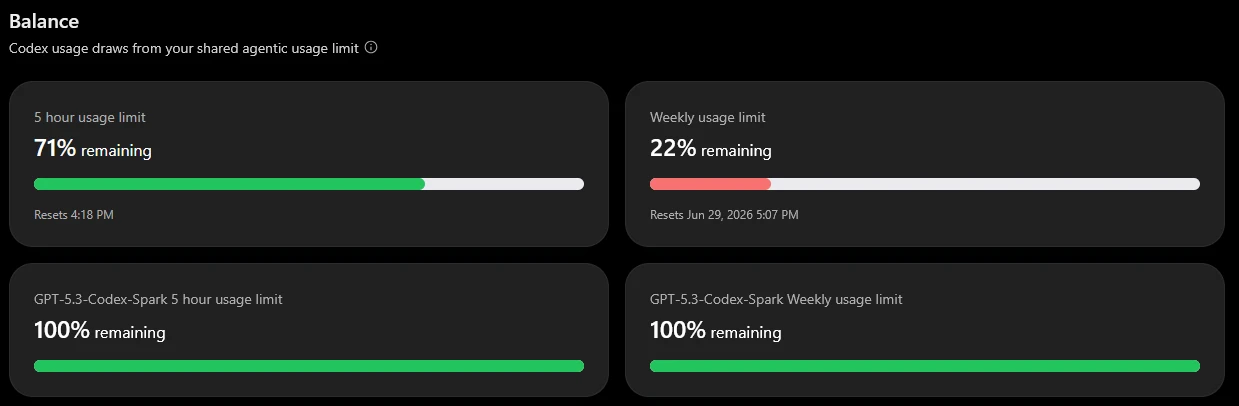
It appears that allowing OpenAI to train off your usage is ON by default. Disable this not only in the Codex application, but also online under Codex Data controls as well as ChatGPT Data Controls
| Date | Models | Input | Output | Reasoning | Cache Read | Total Tokens | Cost (USD) |
|---|---|---|---|---|---|---|---|
| 2026-02-… | - gpt-5.2-codex | 115,207 | 4,492 | 1,344 | 371,072 | 490,771 | $0.33 |
| 2026-06-… | - gpt-5.5 | 6,657,847 | 247,538 | 50,654 | 123,908,992 | 130,814,377 | $102.67 |
| 2026-06-… | - gpt-5.5 | 16,930,726 | 608,531 | 109,532 | 340,087,552 | 357,626,809 | $272.95 |
| 2026-06-… | - gpt-5.3-codex-spark | 21,217,605 | 1,456,077 | 646,850 | 430,931,200 | 453,604,882 | $309.47 |
| - gpt-5.5 | |||||||
| Total | 44,921,385 | 2,316,638 | 808,380 | 895,298,816 | 942,536,839 | $685.42 |
I’ve been using gpt-5.3-codex-spark as subagents for tasks, and it’s been working well. This is my usage after hitting a full week’s quota on the Codex $100 plan. I have 63% remaining with the spark model’s quota. I’ll definately be using that from the start!
Previewing an upgrade to the $200 plan shows me an adjustment of -$92.99 from the $200 plan. Obviously these are not API prices, nor the true value, but that’s the discount!
Tips for saving a huge number of tokens
Using less tokens means less expensive pricing if you’re paying API prices, or longer lasting subscriptions. Using Superpowers to get rock-solid plans, with the “Grill me” skill for having the AI ask you as many questions as it needs until it one-to-one understands what your goal is can save a huge amount of tokens.
Using the Grill me skill with a very cheap model to pad information is a great way to take tokens further.
Using the Plan skill sounds like a waste at first, but asking it to run over the plan a few times or double-check for false positives can really help iron-out hallucinations.
Not to mention: When a new session is open the AI has to understand the codebase. There’s usually a LOT of files with a lot of code. Using CodeGraph can save a HUGE number of tokens. The AI asks something, and it gets short responses back. This installs and works seamlessly with OpenCode, Cursor and even Antigravity (but I’ve had less luck with it really saving tokens here). You should REALLY consider the free and open-source codegraph project .
Where next?
I am likely going to try the more expensive $100 plan with Claude or, more likely, ChatGPT with Codex. Again those are changing. Anthropic with their expensive models, and Codex with it’s “2x tokens” coming to an end at the end of May.
There is a lot more I want to do and I’m tired of running in debugging circles with Antigravity (as well as fighting the “we’re too busy” errors I keep running into. It’s driving me nuts now that my Cursor sub quotas are saturated).
